Prevent plus-addressing account creation abuse (Part 2)
/ 7 min read
Table of Contents
Introduction
In my previous blog post I demonstrated how we can prevent multiple signups in an application from users using plus addressing (i.e an email like mary+1@gmail.com). The reason behind this is that users use this technique to create multiple accounts with essentially the same email address (i.e. mary@gmail.com) to abuse application trial benefits.
In the previous blog post we looked at a quick and effective way to prevent this by piggybacking on the existing functionality of ASP.NET Core Identity to create a normalized email and username. The NormalizedUserName and NormalizedEmail properties are essentially uppercase versions of the username and email properties and are used for comparison when ensuring unique usernames and emails during signup.
In that blog post, we (ab)used these two properties to store the primary email address instead, which in turn resulted in the primary email address being used to ensure unique usernames and email addresses. That approach worked, but the user experience was confusing.
A better approach
In this blog post I want to address the sub-par user experience by taking a different approach. Specifically, we will be adding a property to our ASP.NET Core Identity model where we will store the primary email address for an email used during signup and then use that property to ensure uniqueness.
The idea is that when a user signs up using the email address mary+1@gmail.com, we will be storing the primary email - which is mary@gmail.com - in the new property. If the user subsequently attempts to sign up with mary+2@gmail.com we will check whether the primary email address (i.e. mary@gmail.com) is already registered by another account and, if so, disallow the signup.
This approach will consist of two parts.
- First, we want to create a new
PrimaryEmailshadow property to ourIdentityUserEF Core schema. We will use an interceptor to automatically extract and store the primary email address in this property every time a user adds or updates a user. - Secondly, we will create a custom user validator to check the email address of a user against the primary email addresses stored in the database to ensure uniqueness. Custom validators are run when a user signs up and also when user information is updated - for example when a user changes their email address.
Saving the primary email
As mentioned above, the first part in this approach is to update our ASP.NET Core Identity Schema to add a shadow property that will contain the primary email for the email address associated with a user account. I also added a unique index to enforce uniqueness as the database level.
public class ApplicationDbContext(DbContextOptions<ApplicationDbContext> options)    : IdentityDbContext(options){    protected override void OnModelCreating(ModelBuilder builder)    {        builder.Entity<IdentityUser>(eb =>        {            eb.Property<string>("PrimaryEmail").HasMaxLength(256);
            eb.HasIndex("PrimaryEmail")                .HasDatabaseName("PrimaryEmailName")                .IsUnique();        });
base.OnModelCreating(builder); }}Next, we’ll need a helper class which will extract the primary email for any given email address. We use a regular expression which will match when the email address contains a + in the username. If it does not match the regular express, we convert the email to uppercase and return it. If it matches, we extract the username part of the email along with the domain name and convert it to uppercase.
In other words, for the email mary+123@gmail.com, the method will return MARY@GMAIL.COM. For the email mary@gmail.com, it will return MARY@GMAIL.COM.
public partial class PrimaryEmailHelper{    public const string PrimaryEmailPropertyName = "PrimaryEmail";
    public static string ExtractPrimaryEmailAddress(string value)    {        if (PlusAddressingRegex().Match(value) is not { Success: true } match)        {            return value.Normalize().ToUpperInvariant();        }
        return $"{match.Groups["username"].Value}@{match.Groups["domain"].Value}"            .Normalize()            .ToUpperInvariant();    }
    [GeneratedRegex(@"^(?<username>.+)(?<subaddress>\+.*)@(?<domain>.+)$")]    private static partial Regex PlusAddressingRegex();}
Finally, we need to update the PrimaryEmail shadow property. For this, we’ll create an EF Core interceptor which will update the PrimaryEmail shadow property whenever an entity is added or updated.
public class UpdatePrimaryEmailInterceptor : SaveChangesInterceptor{    public override InterceptionResult<int> SavingChanges(        DbContextEventData eventData,        InterceptionResult<int> result    )    {        if (eventData.Context is not { } context)        {            return result;        }
        UpdatePrimaryEmailAddresses(context.ChangeTracker.Entries());
        return base.SavingChanges(eventData, result);    }
    public override ValueTask<InterceptionResult<int>> SavingChangesAsync(        DbContextEventData eventData,        InterceptionResult<int> result,        CancellationToken cancellationToken = new CancellationToken()    )    {        if (eventData.Context is not { } context)        {            return ValueTask.FromResult(result);        }
        UpdatePrimaryEmailAddresses(context.ChangeTracker.Entries());
        return base.SavingChangesAsync(eventData, result, cancellationToken);    }
    private void UpdatePrimaryEmailAddresses(IEnumerable<EntityEntry> entries)    {        foreach (var entry in entries)        {            if (entry.State is EntityState.Added or EntityState.Modified)            {                var email = entry.Property(nameof(IdentityUser.Email)).CurrentValue?.ToString();                if (email is null)                {                    entry.Property(PrimaryEmailHelper.PrimaryEmailPropertyName).CurrentValue = null;                    continue;                }
                entry.Property(PrimaryEmailHelper.PrimaryEmailPropertyName).CurrentValue =                    PrimaryEmailHelper.ExtractPrimaryEmailAddress(email);            }        }    }}
We will also need to register the interceptor with EF Core.
builder.Services.AddDbContext<ApplicationDbContext>(options => options.UseSqlite(connectionString) .AddInterceptors(new UpdatePrimaryEmailInterceptor()));Now, when we register a user with the email mary+123@gmail.com, the primary email is stored correctly in the PrimaryEmail column in the database.
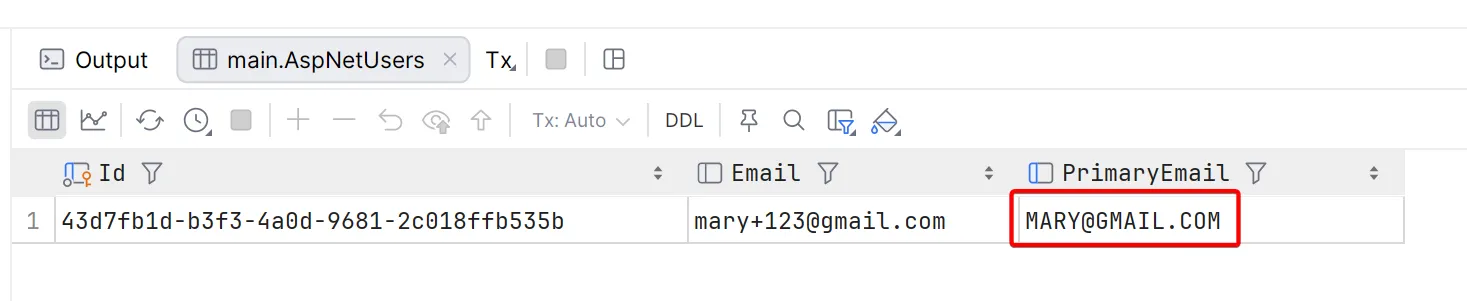
Let’s try and register a second user with the same primary email address, for example mary+456@gmail.com.
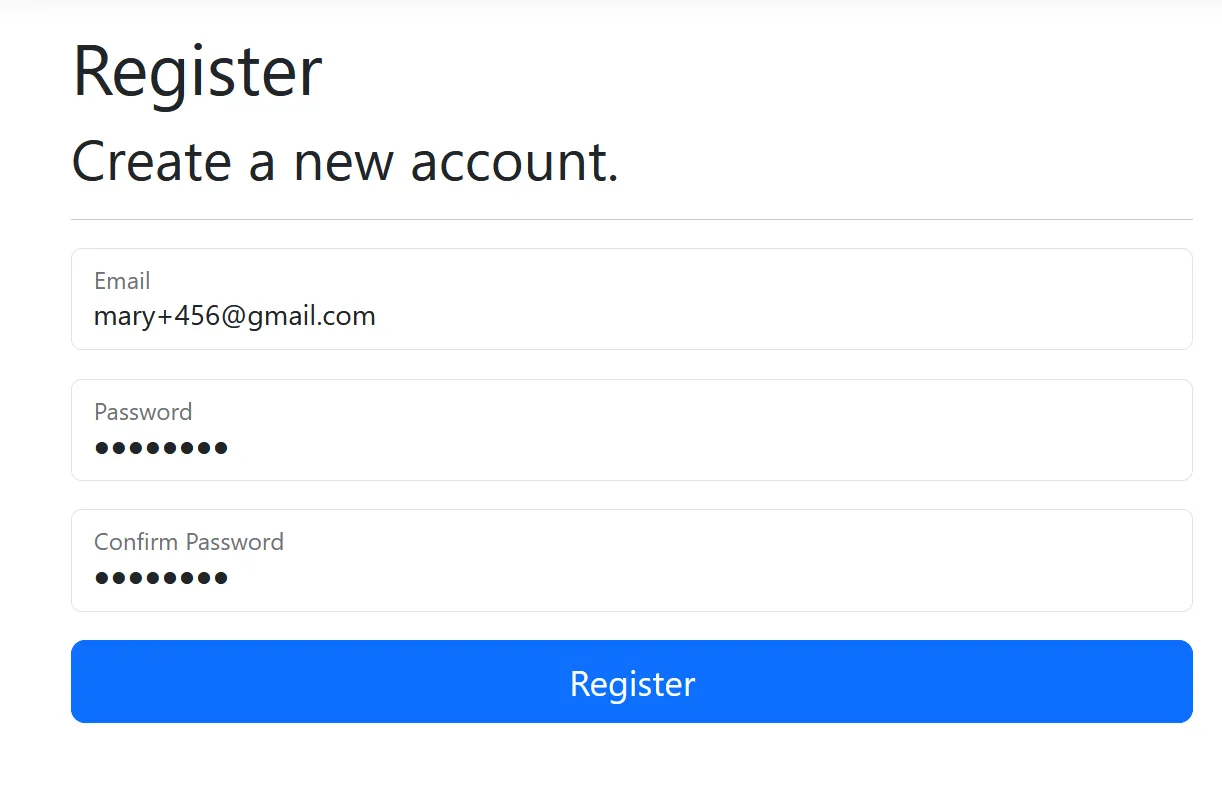
As you can see, we are getting an error due to the unique constraint on the PrimaryEmail column.

Adding a user validator
Obviously, we do not want to get an error due to the unique constraint. We should return a proper error to the user. For that, we can create a user validator that queries the database to see whether a user with the same primary email already exists and return the appropriate error or success result.
public class PrimaryEmailUserValidator : IUserValidator<IdentityUser>{    public async Task<IdentityResult> ValidateAsync(        UserManager<IdentityUser> manager,        IdentityUser user    )    {        if (string.IsNullOrEmpty(user.Email))        {            return IdentityResult.Success;        }
        var email = PrimaryEmailHelper.ExtractPrimaryEmailAddress(user.Email);        var matchedUser = await manager.Users.FirstOrDefaultAsync(u =>            EF.Property<string>(u, PrimaryEmailHelper.PrimaryEmailPropertyName) == email        );
        if (matchedUser != null && !string.Equals(matchedUser.Id, user.Id))        {            return IdentityResult.Failed(                new IdentityError                {                    Code = "PRIMARY_EMAIL_REUSE_DISALLOWED",                    Description =                        $"An account with the primary email {email.ToLowerInvariant()} already exists. You cannot register multiple accounts with the same primary email.",                }            );        }
        return IdentityResult.Success;    }}
We also need to register the user validator.
builder.Services.AddDefaultIdentity<IdentityUser>(options => { //... }) .AddEntityFrameworkStores<ApplicationDbContext>() .AddUserValidator<PrimaryEmailUserValidator>();Let’s try again to register another user with the same primary email address. This time, we get a proper error message.
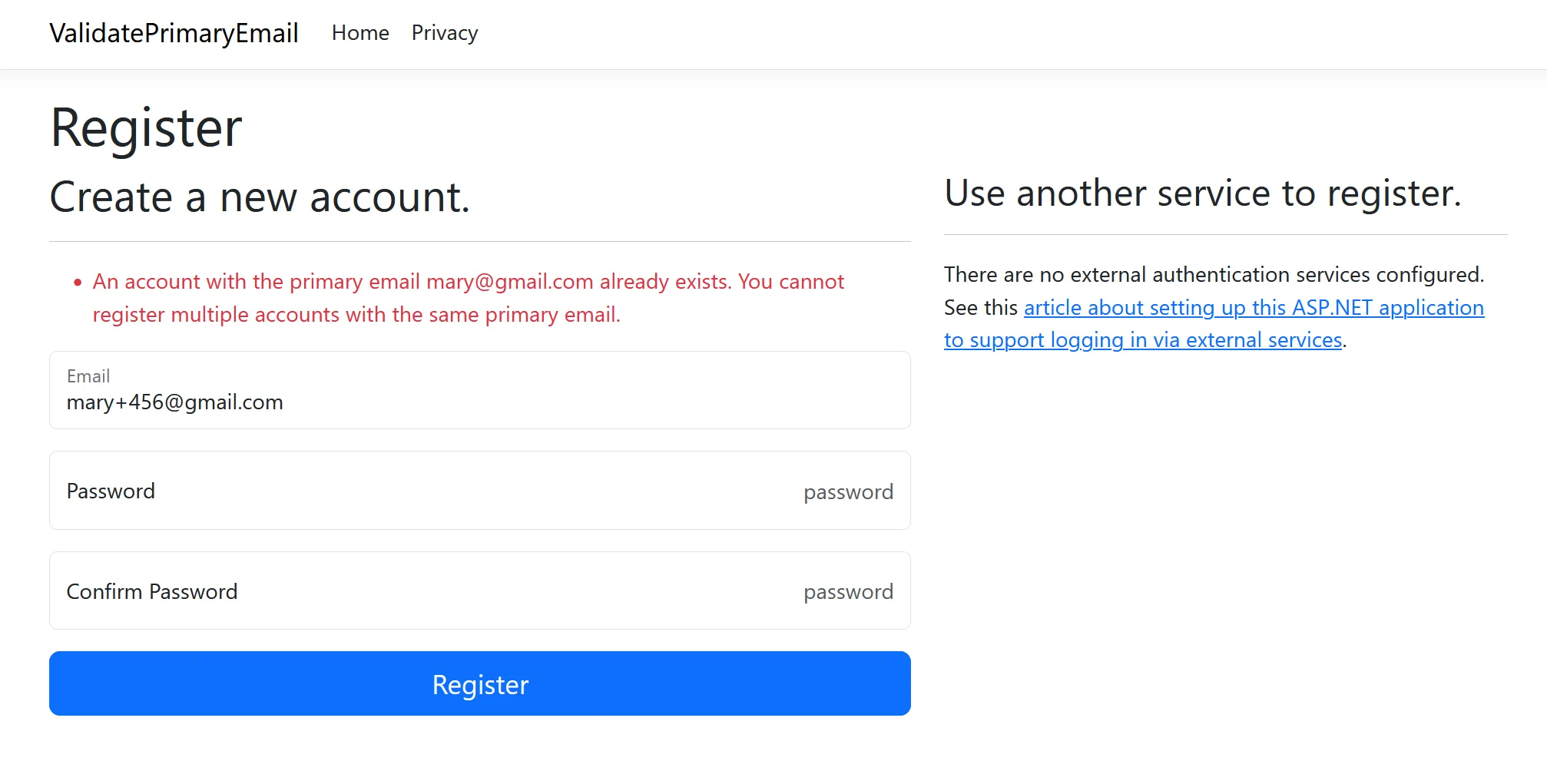
The user validator also works when a user changes their email address to ensure uniqueness.
Additional food for thought
This technique does not provide 100% protection against multiple signups using the same email address. Depending on the email provider, there are other ways to work around this.
- In Gmail the dots don’t matter in the email address, so
mary@gmail.comandm.a.r.y@gmail.compoints to the exact same mailbox. Someone can sign up usingmary@gmail.comand then later create a second account usingm.a.r.y@gmail.com. - In Fastmail you can easily add aliases, catch-all aliases, or masked email addresses with little effort.
I am sure other email providers have similar workarounds, so this may turn into an endless game of whack-a-mole.
If it is important for you not to allow multiple signups from the same account, you should consider using OAuth 2.0 authentication using something like Google and use the user ID returned from the OAuth 2.0 provider as the unique identifier for your users.
As a user, I do not like OAuth 2.0 signups, but from experience of running a SaaS application I can tell you that it will save you from a lot of account abuse issues like the one we discussed in the blog post, as well as others.
Conclusion
In this blog post I demonstrated how you can prevent users from signing up multiple times with the same email address by using plus-addressing (i.e. using a + in the email address). We did this by adding a unique database column that contains the main email address, as well as a user validator to ensure the primary email address is not being reused.
Source code can be found at https://github.com/jerriep/aspnet-identity-plus-addressing-validate-primary-address.