Disallow application signups with emails containing a plus
/ 7 min read
Table of Contents
Introduction
The past few years I worked on a SaaS application (which I have since shut down) which allowed users to export content from Google Docs or Notion to various Content Management Systems. When users signed up, they were given free trial credits that allowed them to export a limited number of documents for free.
I ran into an issue where users abused the trial by signing up multiple times with a single email address. Specifically, they used plus addressing (or sub-addressing) to reuse the same email address for signup.
In this blog post, I want to demonstrate how you can limit this practice by creating a custom user validator for ASP.NET Core Identity.
What is plus addressing
Plus addressing is a feature of many email providers that allow you to create multiple, disposable email addresses from a single primary email address by adding a plus sign (+) and additional letters before the email domain.
For example, let’s say you have the email address mary@gmail.com, you can create an additional email address such as mary+news@gmail.com. When an email is sent to mary+news@gmail.com, the email provider effectively ignores the +news part of the email address and delivers the email to mary@gmail.com.
There is zero effort required on your end to do this. In other words, you don’t have to go and register the email address or alias mary+news@gmail.com with your email provider beforehand. You can simply type that email address wherever you need to fill in your email address, and it will just work.
Why do people use plus addressing?
There are various reasons people use plus addressing. Probably the most common one I’ve seen is to add the name of the service they signed up for to the email address, so they can identify it later if their email was leaked or sold.
Let’s say you sign up for an application called “My Super Saas”, you can use the email address mary+mysupersaas@gmail.com. Now, if you ever see spammers contact you using that email address, you can easily identify “My Super Saas” as the culprit who sold or leaked your email address.
People also often use this to categorize incoming emails. For example, you can use +news to sign up for email newsletters and then add a rule to your email client to automatically send those emails to a specific folder. Or you can use +banking for your online bank accounts and automatically prioritise those emails in your inbox.
Another reason people use plus addressing is the one I mentioned in the introduction, which is to circumvent trial period limitations. For example, they will sign up for a SaaS using the email address mary@gmail.com. Once the trial period is over, they will sign up for a new account using the email address mary+1@gmail.com in order to start a new free trial. They will continue this cycle forever, or until someone figures it out.
In my case, my SaaS was small enough that I knew the email address of every new user that signs up and noticed this pattern easily. But, in a larger SaaS application this abuse can go unnoticed for years.
Introducing custom user validators in ASP.NET Identity
You can prevent signups for your application by people using plus addressing by validating the email address of the user during signup. In ASP.NET Core Identity, the correct extension point to use for this would be to create a custom user validator.
ASP.NET Core Identity defines the following interface:
public interface IUserValidator<TUser> where TUser : class{ public Task<IdentityResult> ValidateAsync(UserManager<TUser> manager, TUser user);}To create a custom user validator, create a class which inherits from this interface and implement the ValidateAsync method.
public class MyCustomUserValidator : IUserValidator<IdentityUser>{ public Task<IdentityResult> ValidateAsync(UserManager<IdentityUser> manager, IdentityUser user) { // ... }}Inside the ValidateAsync method you can perform your custom validation logic and then return either IdentityResult.Success if the validation passes, or IdentityResult.Failed() with the validation errors.
Creating and registering a custom user validator
Let’s look an example of creating a user validator that checks whether the user is attempting to use an email with plus addressing to register an account. To detect this, we can use the regular expression ^.+\+.*@.+$. This regular expression checks whether there is a plus sign in the email address before the domain.
This regular expression assumes that the actual email address format has already been validated, or will subsequently be validated, so it does not do any checks to see whether the format of the email address itself is valid.
We can create a new class named PlusAddressingValidator which implements the code for the validator.
public partial class PlusAddressingValidator : IUserValidator<IdentityUser>{    public Task<IdentityResult> ValidateAsync(UserManager<IdentityUser> manager, IdentityUser user)    {        if (string.IsNullOrEmpty(user.Email))        {            return Task.FromResult(IdentityResult.Success);        }
        if (PlusAddressingRegex().IsMatch(user.Email))        {            return Task.FromResult(                IdentityResult.Failed(                    new IdentityError                    {                        Code = "USER_PLUS_ADDRESSING_DISALLOWED",                        Description = "You cannot use a plus sign (+) in your email address.",                    }                )            );        }
        return Task.FromResult(IdentityResult.Success);    }
    [GeneratedRegex(@"^.+\+.*@.+$")]    private static partial Regex PlusAddressingRegex();}
We also have to register the validator by making a call to IdentityBuilder.AddUserValidator<TValidator>() when configuring ASP.NET Core Identity.
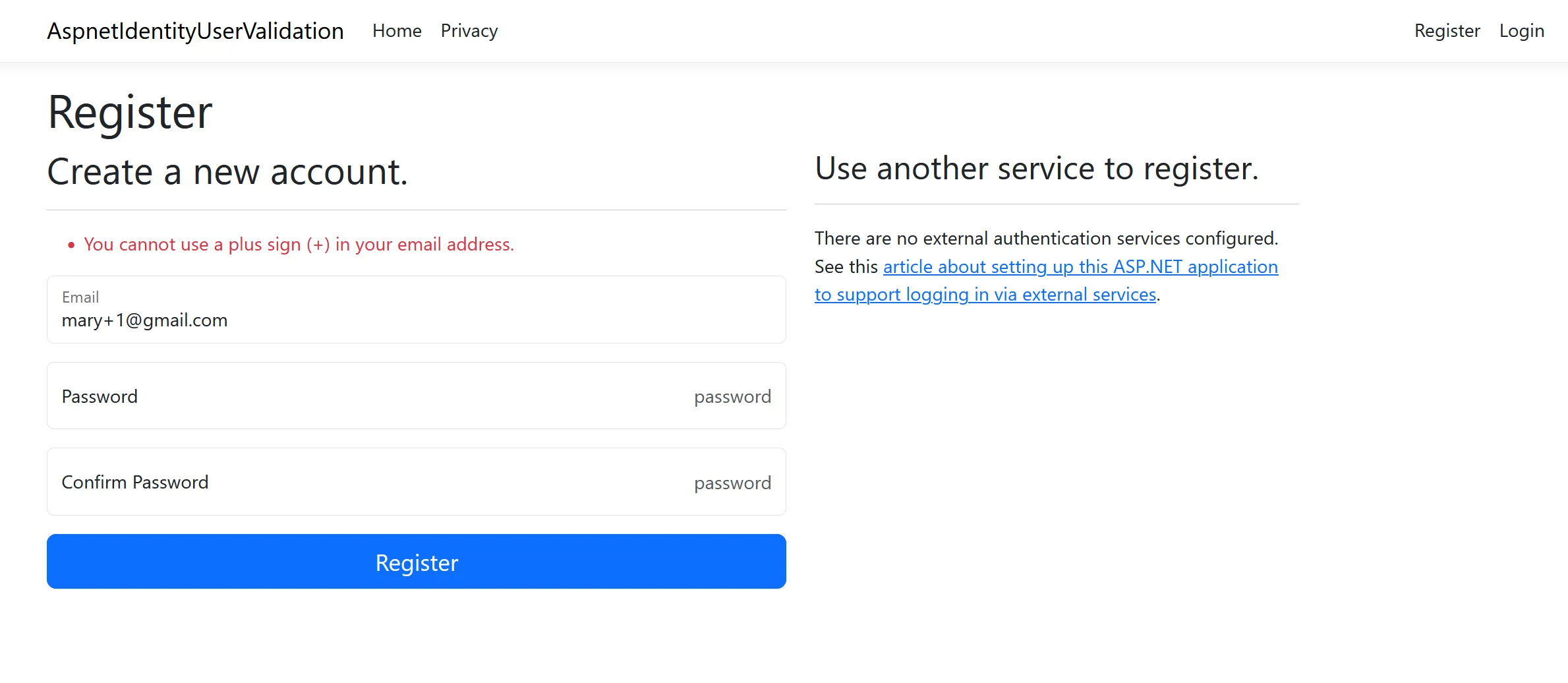
builder .Services.AddDefaultIdentity<IdentityUser>(options => { //... }) .AddEntityFrameworkStores<ApplicationDbContext>() .AddUserValidator<PlusAddressingValidator>();With that in place, let’s try and register a user with an email address that makes use of plus addressing. As you can see, the application returns an error and does not allow the user to sign up using this email address.
Providing a better validation error message
The solution above works, but I would like to give the user a more helpful error message indicating what the desired input would be. When the user uses the email address “mary+123@gmail.com”, I would like to display an error message such as “An email with a sub-address (+123) is not allowed. Use only the primary email address - i.e. mary@gmail.com”.
To do this, we can update the regular expression to add capturing groups for the different parts of the email so we can extract the values entered by the user and use them in the error message.
Here is the updated code with the new regular expression and logic for the error message:
public partial class PlusAddressingValidator : IUserValidator<IdentityUser>{    public Task<IdentityResult> ValidateAsync(UserManager<IdentityUser> manager, IdentityUser user)    {        if (string.IsNullOrEmpty(user.Email))        {            return Task.FromResult(IdentityResult.Success);        }
        if (PlusAddressingRegex().Match(user.Email) is { Success: true } match)        {            return Task.FromResult(                IdentityResult.Failed(                    new IdentityError                    {                        Code = "USER_PLUS_ADDRESSING_DISALLOWED",                        Description =                            $"An email with a sub-address ({match.Groups["subaddress"].Value}) is not allowed. Use only the primary email address - i.e. {match.Groups["username"].Value}@{match.Groups["domain"].Value}",                    }                )            );        }
        return Task.FromResult(IdentityResult.Success);    }
    [GeneratedRegex(@"^(?<username>.+)(?<subaddress>\+.*)@(?<domain>.+)$")]    private static partial Regex PlusAddressingRegex();}
When running the application, you can see the improved error message in action.

Some additional thoughts
Whether this solution is appropriate for your application, will depend on you. If you want to prevent plus addressing outright, then this is a good way to go about it. However, as I mentioned in the explainer about plus addressing, sometimes users use this for valid reasons such as identifying the service or category of service they signed up for.
So, the ideal solution may not be to prevent users from signing up but rather to strip the sub-address and only use the primary address as the unique identifier for an email address. We’ll look at this scenario in a future blog post.
Conclusion
Plus addressing (or sub-addressing) is a technique users can use to create multiple email address aliases for a primary email address. Some users may use this technique to register multiple accounts and abuse the trial benefits of your application. In this blog post, we looked at how to add a custom user validator to ASP.NET Core Identity to prevent this.
Source code for the accompanying demo application can be found at https://github.com/jerriepelser-blog/aspnet-identity-user-validation.