Introduction
A while back I wrote a series of blog posts about Learning Thai with AI. I described my workflow for exporting and importing the cards using CrowdAnki and then ultimately using a C# application to work with the exported JSON.
I used the normal method for working with JSON in C# which was to declare a POCO object representing the JSON properties, deserializing the JSON into objects, manipulating those objects, and ultimately serializing them back to a JSON file.
Once I ran my application I realised to my shock that I lost a lot of the JSON properties in the round-trip. This blog post describes the problem in more detail and also the ultimate solution - which, if you’re in a hurry, is to use JsonExtensionData.
The problem
To demonstrate the problem, let’s take an example where you want to process an orders JSON file from a supplier, do some manipulation, and write the orders back to a different JSON file. The JSON file we receive from the supplier looks as follows:
{ "schemaVersion": "2026-05-01", "generatedAt": "2026-08-26T09:15:00Z", "source": "orders-export-api", "pageSize": 10, "totalCount": 10, "cursor": null, "orders": [ { "id": "ord_01HQ8XJ4K2M9P3R7T5V1W6Y8Z0", "orderNumber": 1000000001, "status": "processing", "currency": "USD", "subtotal": 19.90, "tax": 1.79, "shipping": 0.00, "discount": null, "discountCode": null, "total": 21.69, "placedAt": "2026-08-26T14:30:00+02:00", "updatedAt": "2026-08-26T14:31:12.4570000+02:00", "isGift": false, "notes": "Leave at the front desk.", "tags": ["web", "first-order"], "customer": { "id": "cus_9F3K2M", "email": "dana.moyo@example.com", "firstName": "Dana", "lastName": "Moyo", "phone": null, "locale": "en-ZA", "marketingOptIn": true, "createdAt": "2024-11-02T08:12:44Z", "lifetimeValue": 1284.50, "segment": "returning", "loyalty": { "tier": "gold", "points": 12500, "pointsExpireAt": "2027-01-31T23:59:59Z", "memberSince": "2019-03-14", "multiplier": 1.25 } }, "billingAddress": { "line1": "14 Rivonia Road", "line2": null, "city": "Johannesburg", "region": "GP", "postalCode": "2196", "countryCode": "ZA", "latitude": -26.1076, "longitude": 28.0567, "isValidated": true, "validatedAt": "2026-08-26T14:29:58Z" }, "shippingAddress": { "line1": "14 Rivonia Road", "line2": "Unit 3B", "city": "Johannesburg", "region": "GP", "postalCode": "2196", "countryCode": "ZA", "latitude": -26.1076, "longitude": 28.0567, "isValidated": true, "validatedAt": "2026-08-26T14:29:58Z" }, "items": [ { "lineId": "li_0001", "type": "physical", "sku": "TS-BLK-M", "name": "Heavyweight Tee", "quantity": 2, "unitPrice": 9.95, "lineTotal": 19.90, "taxRate": 0.1500, "weightKg": 0.250, "attributes": { "color": "black", "size": "M", "material": "cotton" }, "tags": ["apparel"], "fulfillment": { "warehouseId": "wh_jhb_01", "shippedAt": null, "carrier": null, "trackingNumber": null } } ], "payments": [ { "paymentId": "pay_3PxQ1a2b3c", "method": "card", "brand": "visa", "last4": "4242", "amount": 21.69, "currency": "USD", "status": "captured", "capturedAt": "2026-08-26T14:30:04Z", "processorReference": "ch_3PxQ1a2b3c4d5e", "riskScore": 0.0312, "refunds": [] } ], "_vendorMeta": { "source": "shopify-bridge", "syncVersion": "2.4.1", "raw": { "gid": "gid://shopify/Order/12345", "checkoutToken": "9a8b7c6d" }, "flags": ["reprocessed"] } }, ... ]}As you can see, it contains a lot of properties, 99% of which we are not interested in. Let’s say for the sake if argument that we want to change the order status based on some logic which involves looking up the order ID in an external system. The only two properties we are interested in is the id and status, so we declare the following POCO.
public class OrderEnvelope{ public Order[] Orders { get; set; }
public class Order { public string Id { get; set; }
public string Status { get; set; } }}We then do the manipulation, save the JSON back to a file, and discover to our shock that the resulting JSON file contains nothing but the two properties we declared. All the other data in the original JSON file was lost in the round-trip.
{ "orders": [ { "id": "ord_01HQ8XJ4K2M9P3R7T5V1W6Y8Z0", "status": "processing" }, { "id": "ord_01HQ8XJ5B7N2Q4S8U6W2X9Z1A3", "status": "awaiting_payment" }, { "id": "ord_01HQ8XJ6C8P3R5T9V7X3Y0A2B4", "status": "shipped" }, { "id": "ord_01HQ8XJ7D9Q4S6U0W8Y4Z1B3C5", "status": "partially_refunded" }, { "id": "ord_01HQ8XJ8E0R5T7V1X9Z5A2C4D6", "status": "delivered" }, { "id": "ord_01HQ8XJ9F1S6U8W2Y0A6B3D5E7", "status": "delivered" }, { "id": "ord_01HQ8XJAG2T7V9X3Z1B7C4E6F8", "status": "cancelled" }, { "id": "ord_01HQ8XJBH3U8W0Y4A2C8D5F7G9", "status": "delivered" }, { "id": "ord_01HQ8XJCJ4V9X1Z5B3D9E6G8H0", "status": "completed" }, { "id": "ord_01HQ8XJDK5W0Y2A6C4E0F7H9J1", "status": "on_hold" } ]}So what’s going on here?
Solving the problem
The problem is that, once we deserialize the JSON into objects, those objects now become the source of truth for the data. Since we deserialized only some of the properties, all the ones we omitted will also ultimately be omitted when serializing the objects back to JSON.
We need to specify all of the properties on our POCO class. We can do that, and it will certainly solve the problem. But there are a couple of disadvantages to this.
First, it means we have to manually go and add all those properties to our POCO, along with defining additional POCO classes for the nested objects, when all we are interested in are two properties.
There are tools that can automate this, but this still leaves us with another potential problem which is that the supplier may add additional properties in the future and if we are not aware they did that and update our POCOs to match the new file, we will be losing data and will be blissfully unaware of it.
The solution, it turns out, is quite simple. System.Text.Json has a built-in method to allow for this scenario where you have unmapped properties in a JSON file.
The way you do that is to add a dictionary property to the POCO which will become a bucket to hold all of this data and decorate it with the [JsonExtensionData] attribute.
public class LosslessOrderEnvelope{ public LosslessOrder[] Orders { get; set; }
[JsonExtensionData] public IDictionary<string, JsonElement> Extra { get; set; }
public class LosslessOrder { public string Id { get; set; }
public string Status { get; set; }
[JsonExtensionData] public IDictionary<string, JsonElement> Extra { get; set; } }}You can see in the code snippet above, that our LosslessOrderEnvelope class contains a property named Extra which is decorated with the [JsonExtensionData] attribute. All properties other that the ones we explicitly declared (i.e. Orders) will go into that dictionary. Same for the nested LosslessOrder class. All properties besides Id and Status will go into its Extra dictionary.
Once you then serialize the object back to JSON, all the properties we did not explicitly declare are still saved back to JSON.
Downsides to JsonExtensionData
This solution works for the most part, but it is not perfect. Consider the following screenshot that compares the original JSON to the saved JSON.
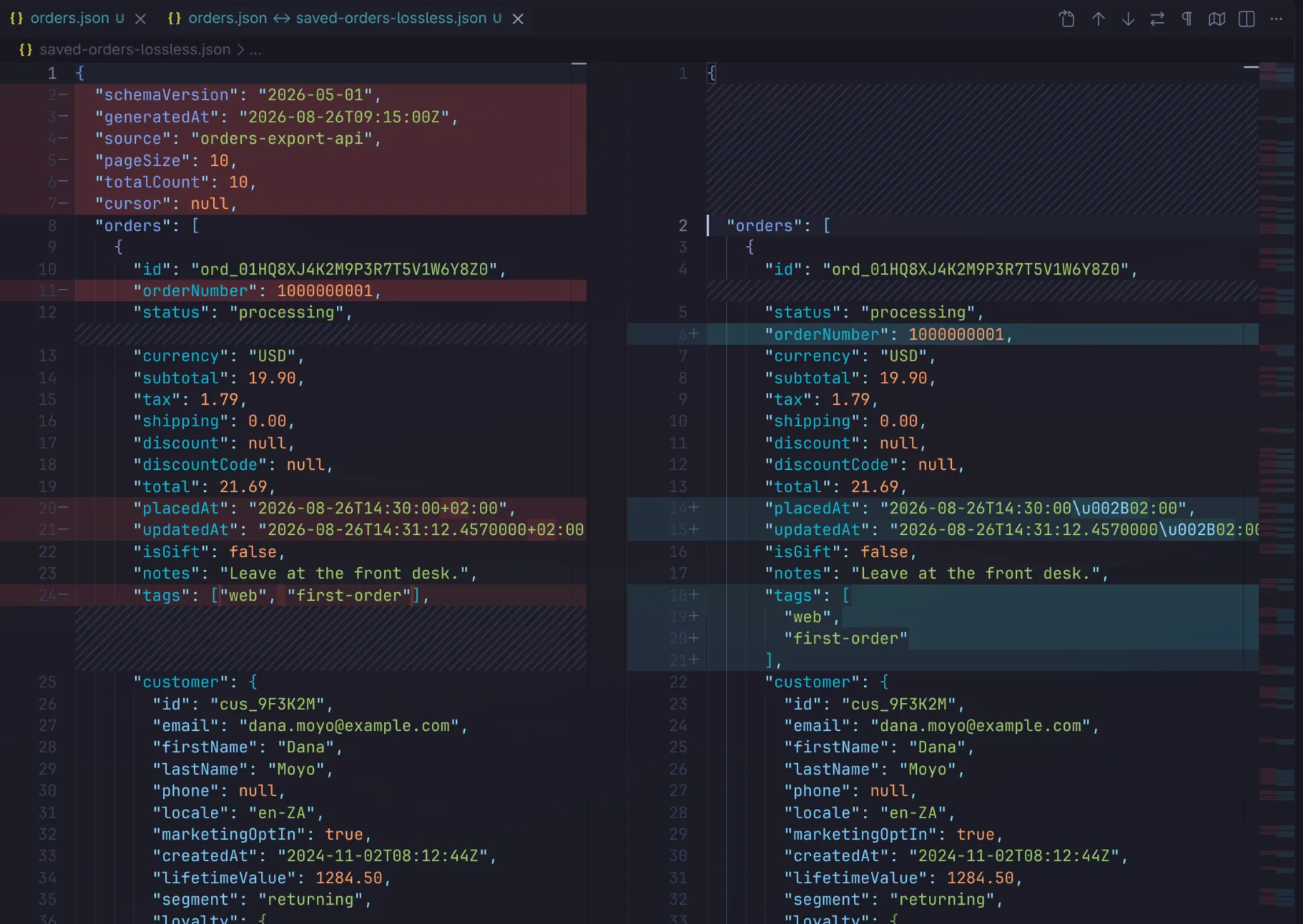
At first glance it appears all the properties at the top of the file were lost. However, if we scroll down to the bottom, you can see that they all moved to the bottom of the JSON file.
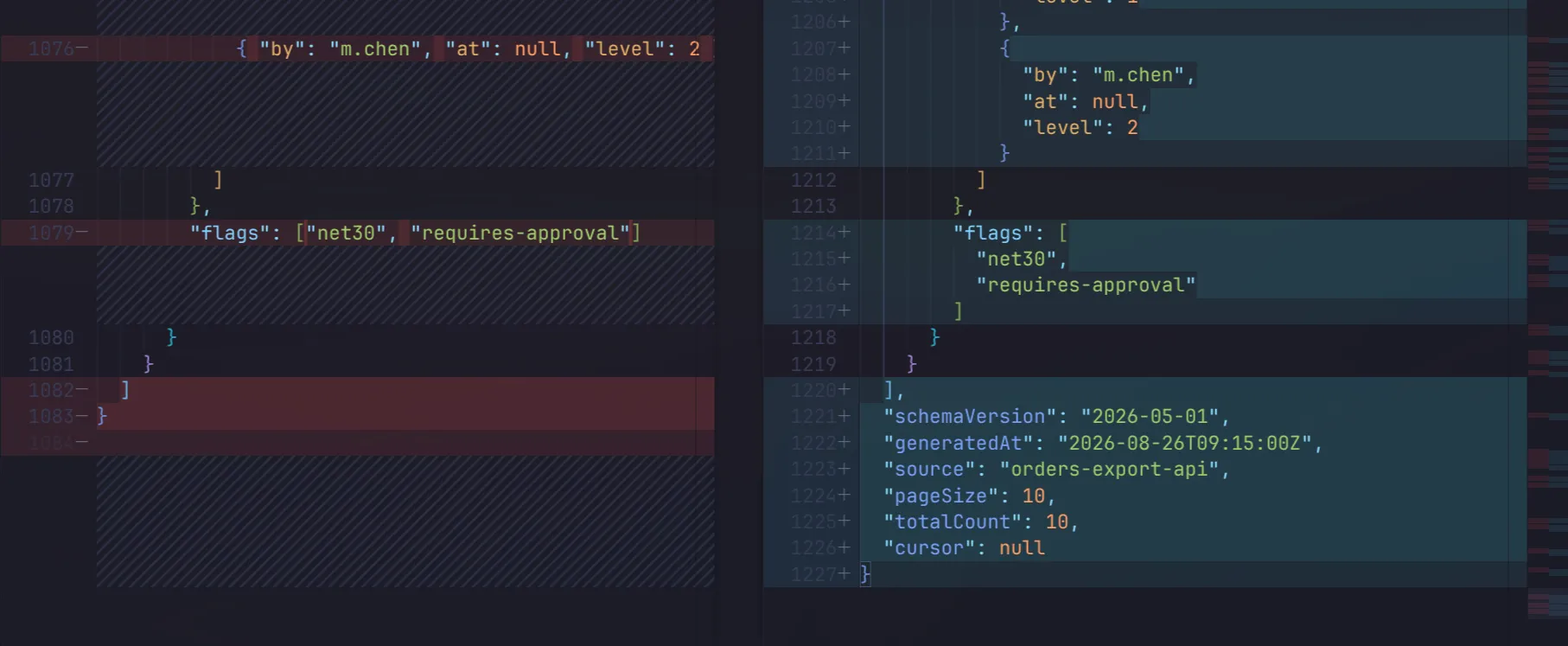
The reason for this is that the data in that [JsonExtensionData] dictionary is appended after all the other properties.
Another bigger problem can be seen in the screenshot below.

The problem here is that those date properties are treated by extension data as strings and when writing back to JSON, it will do encoding for things like the + sign. You have a couple of options here:
The first is to explicitly declare those date properties as DateTimeOffset properties in the POCO. Consider the updated LosslessOrder class below which explicitly declares the PlacedAt property.
public class LosslessOrder{ public string Id { get; set; }
public string Status { get; set; }
public DateTimeOffset PlacedAt { get; set; }
[JsonExtensionData] public IDictionary<string, JsonElement> Extra { get; set; }}When we roundtrip the data again you can see that the PlacedAt property was round-tripped correctly.
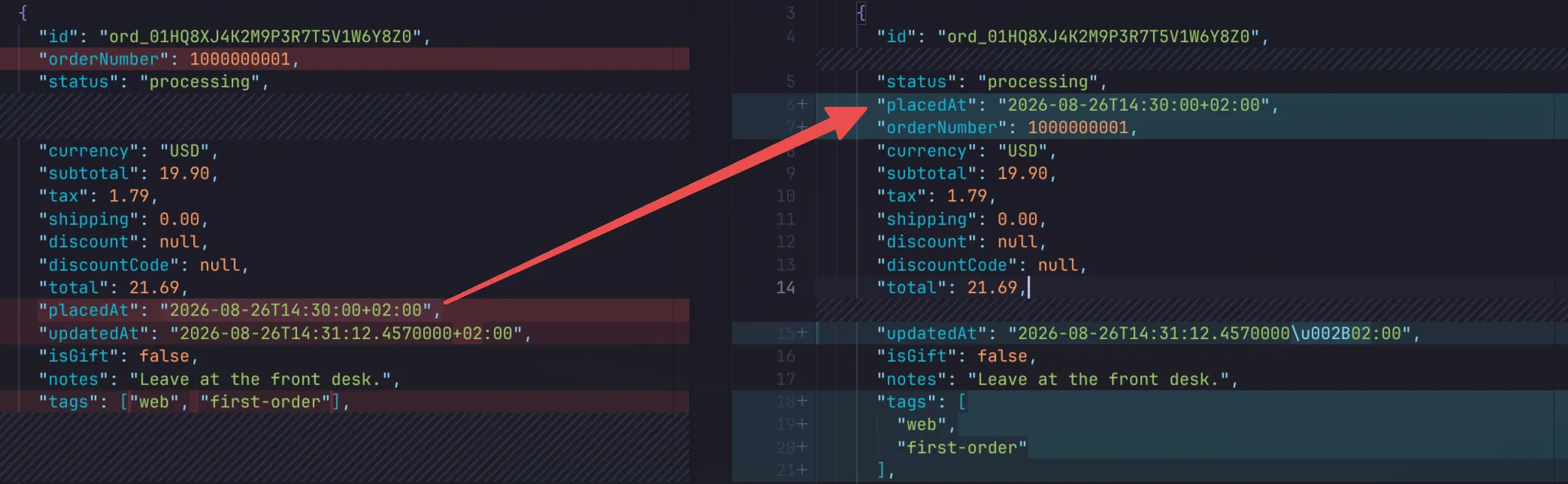
The other option would be to relax the JSON escaping in the encoder we use in the serializer.
JsonSerializerOptions jsonSerializerOptions = new JsonSerializerOptions(JsonSerializerOptions.Web){ Encoder = JavaScriptEncoder.UnsafeRelaxedJsonEscaping, WriteIndented = true,};With this in place, you can see that the updatedAt property, which was round-tripped in the extension data, is also serialized correctly.
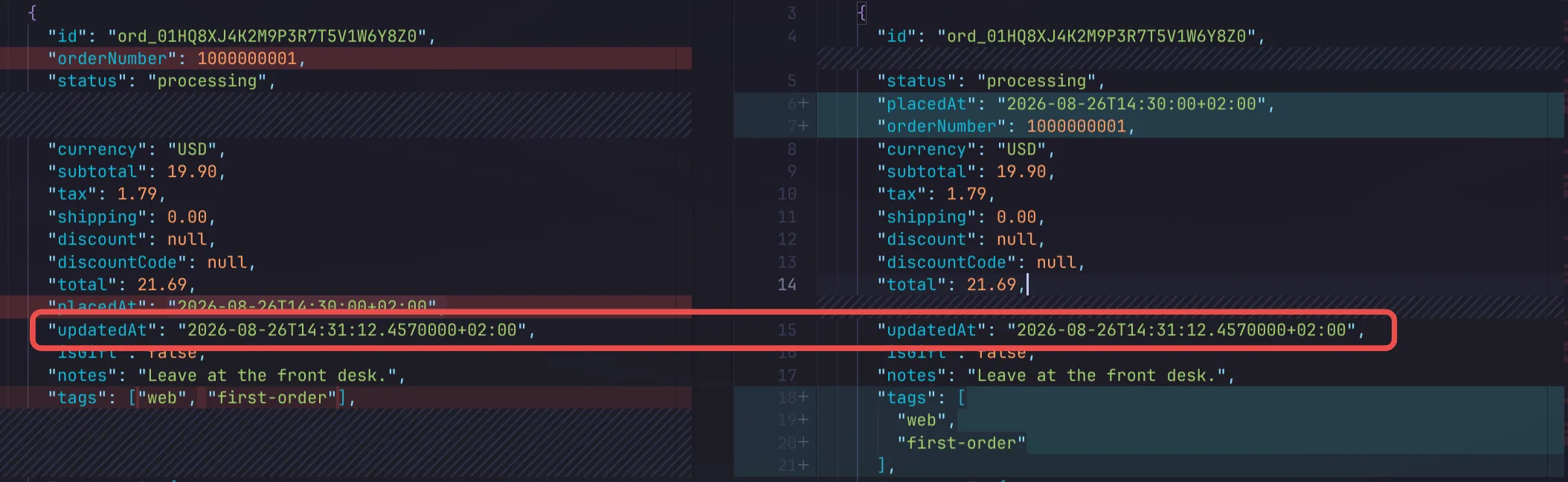
Just be aware though that this may cause unintended consequences elsewhere as you are now relaxing the JSON escaping across the board.
Conclusion
In this blog post I described a common problem you may run into when round-tripping JSON when only deserializing and serializing partial properties. I demonstrated how this can be mitigated using [JsonExtensionData], but even that approach may not be perfect.
Ultimately, it will be up to you to decide whether you can live with the downsides of this approach. If not, you just may have to bite the bullet and declare each of those 100s of properties on your POCOs.
You can find the example source code for this blog post at https://github.com/jerriepelser-blog/lossless-json-roundtripping.